Serverless Email Parsing
July 7, 2023Serverless Email Parsing
We are pleased to introduce a new data acquisition method for our Parse and Store clients.
A Brief Reintroduction to Parse and Store
Parse and Sore is a service option where Empirasign clients can view all their Private Market Data on the same screen as the Empirasign Public Database. Parse and Store links our market leading parser with our market leading web application. The chart below illustrates the basic mechanism.

All clients can access this system at no additional cost for up to 100 messages per day. The easiest way to do this is via our Email Gateway Interface (EGI). Simply send a Run or BWIC message to the appropriate address, and we'll index and display the data (for your eyes only) on our web application.
EGI Email Addresses
Of course, we have clients who look to index thousands of messages a day. And that's where data acquisition gets tricky.
Currently Available Methods
Auto Forward
The client forwards all market data messages to a private dropbox we set up for you (e.g. [email protected]). This method works, but has downsides.
- Email is usually handled as low priority network traffic, and it could take minutes for an auto-forwarded message to hit your assigned dropbox.
- The forwarding process could clog up the Sent Mail folder of your own email account.
- Potential bandwidth limits--this method doubles the number of emails you send and receive per day.
IMAP
IMAP is a programmatic interface to an email mailbox. This method is superior to forwarding, but requires your email server supports IMAP (Outlook, by default, does not). Furthermore, you must run a program that is constantly scouring your mailbox for new messages to send along to our servers. You can read more about this method in our Stop Forwarding and Start POSTing blog entry.
Yes, we buried the lede...
Microsoft Graph API (NEW)
The Microsoft Graph API is a broad API interface to all things cloud-based for Microsoft. If your shop uses Outlook 365, you can authenticate our application, and we'll take care of all the data acquisition and parsing tasks for you. To repeat, via this method there is no software for you to install, run, or maintain.
Getting Starting
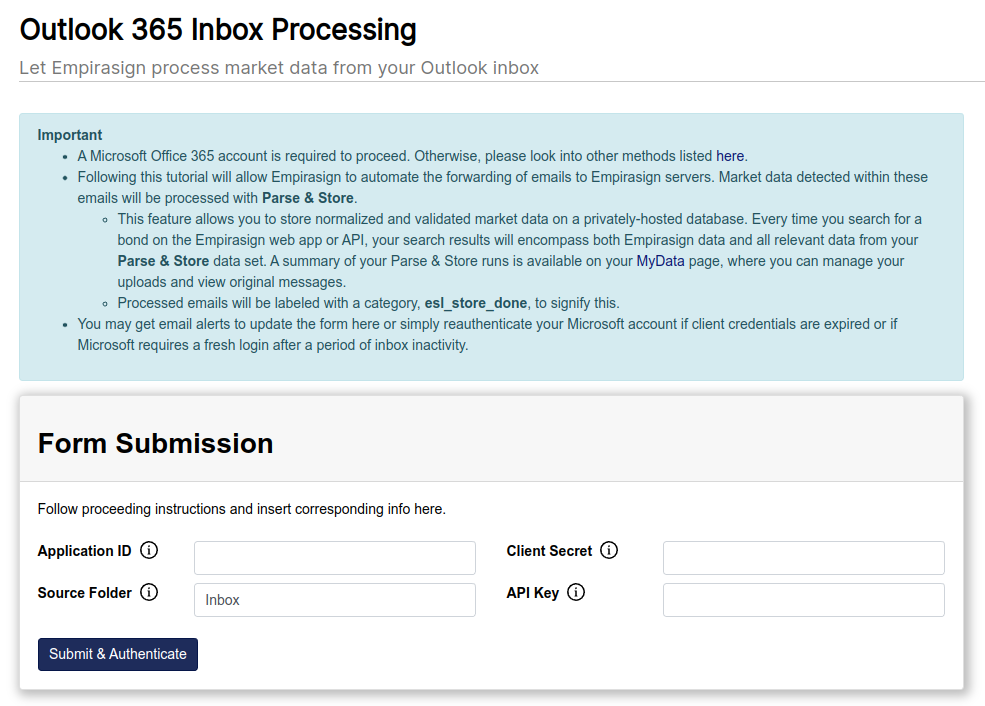
Proceed to the authentication page which can be found under the MyData section of the nav bar (see link and screenshot below). The instructions on this page will show you how to generate the authentication tokens for our application (after being redirected to Azure). You will also select what mailbox folder you want targeted by Parse and Store. After generating these tokens, our machines are alerted and the data acquisition and parsing process runs automatically.
www.empirasign.com/outlook365-form/
Your Data is Your Data
Any data collected via Parse and Store is only viewable to you. All such data can be managed on the MyData page (screenshot below). You can view emails and raw data, export raw and parsed data, and delete items. Data sharing within your organization can be permissioned here as well.

Technical Audience
Much of the material presented here has been quite technical. Don't worry, none of this will be on the final exam. Please feel free to have your IT staff coordinate with us. With all solutions, we provide free implementation and testing assistance.