Browser-Based Excel Cleaner
Dec. 22, 2021
Excel Errors are Everywhere
The London Whale was a spreadsheet formula error. At the London Olympics, they sold more tickets than seats due to a spreadsheet data-entry error. COVID cases were miscounted due to Excel 97-2003 (xls) row limits. In genomics, auto-correct errors have become so endemic that scientists have changed gene names rather than tangle with Excel auto-correct settings. If you search Google News for "spreadsheet errors" you will find examples affecting financial services in the last few business days (as 12/22/21).
Excel as a Database
In finance (and many other domains), Excel is commonly used as an ad-hoc database. A primary source of errors for this off-label use occurs when Excel auto-corrects text to dates or numbers. Today, we're introducing a linting tool that recognizes and reverses these sort of errors.
Problems Solved by our Excel Cleaner
The CUSIP Problem
Any CUSIP that is all numbers or has an E near the end will be auto-corrected by Excel to a floating point number in scientific notation. Click here to see the exact CUSIP pattern that results in this error. Approximately 15% of all N-PORT filings have one or more positions whose CUSIP will be auto-corrected by Excel into a number. For NAIC transaction data, approximately 51% of life, property and casualty insurers have one or more transactions in such securities. Empirasign maintains a comprehensive list of such problem bonds here: www.empirasign.com/cusip-excel-rosetta/.
The 32nds Problem
Prices in Structured Products (and a few other areas of US Fixed Income) are still quoted in 32nds. (Thank you, England!) For bonds near par, Excel will successfully accept them. For example, if you key 99-31 into a spreadsheet or load a CSV with such a value, it will remain as 99-31. However, for low dollar price bonds, such as IOs, they may be auto-converted to dates. For example, if you enter 11-02 into Excel, it will be converted into November 2nd of the current year. The conversion will even occur for dates that make no sense. For example, 4-31 will be converted to April 1, 1931! This will also happen for February dates above 28. These occur quite frequently for specs whose pay-ups are around 3 points.
Find the Empirasign Excel Cleaner at: www.empirasign.com/excel-cleaner/
How to Use
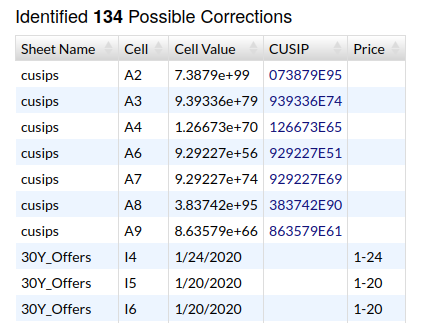
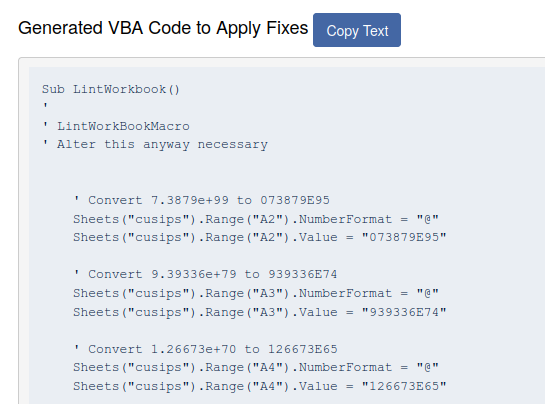
After selecting a file to scan, our linter will get to work. All data processing takes place entirely within your browser (see Data Safety below). If our linter detects fixable errors, they will appear in two sections in the lower part of the page (see images below). The table on left will enumerate each error, its location, and a proposed fix. The section to the right is auto-generated VBA code to apply these fixes. To run these fixes, copy this code into a new VBA module on your spreadsheet, and then execute the LintWorkbook macro. All coded corrections are commented for easy inspection before macro execution.
Data Safety
None of the data in your spreadsheet will leave your browser and hit any remote servers. To verify, hit F12 (Developer Tools) on your browser and watch the Network tab.