INTEX Data Export
March 7, 2022
File System Access API
Using a new browser feature called the File System Access API, we are now able to bring you a previously unattainable level of integration between web-based applications and installed applications. Furthermore, this can all be done without the need to install any new bridge or middleware software. The first integration we are pleased to announce is direct export of Empirasign Market Data to INTEXcalc.
INTEXcalc
INTEXcalc will automatically consume third party market data if such data is in INTEX compatible format and stored in directories INTEXcalc is watching. The former part is relatively easy, but the latter part was impossible without installing extra software--until now, that is. Empirasign has created this automatic integration via leveraging your browser's built-in File System Access API.
Getting Started
- Create a folder called
market_dataunder Documents or on a shared drive. The latter method allows for easy data sharing with colleagues. - Configure your copy of INTEXcalc to read from this directory.
- Go to the BWIC Monitor or Market Monitor tab on INTEXcalc.
- Click the gear icon and select Market Data Settings.
- Change Market Data Directory from Default Location to Custom Location.
- Choose the same
market_datafolder as selected above.
- Click the Refresh button on INTEXcalc to load any data exported from Empirasign.
- The above steps are only necessary upon initial configuration or if your
market_datadirectory location has changed. For security reasons, the File System Access API cannot directly access INTEXcalc's default market data directory location (usually under%APPDATA%).
Screenshot of INTEXcalc Market Data Directory Chooser Dialog

Business Time
With that ceremony out of the way, you are now free to export data at will on any bwic or secid page by clicking on the INTEX icon. In the screenshot below of a sample BWIC, the INTEX export icon is circled in red.

Exported Empirasign Market Data is viewable on the following INTEXcalc screens:
- BWIC Monitor
- Single Deal Analysis
- Portfolio Analysis
- Market Monitor Report
Where Did the Files Go?
Our web application will create bwic data files that look LISTID.bwic (e.g. 220215D.bwic) and market color files that look like ISIN.mktd (e.g. US31395D6Q71.mktd). An example directory tree is displayed below. All files live under the market_data directory you selected above (blue folder in image). All bwic data files live under the bwic\YYYYMMDD subdirectory. The folders in red (bwic and market_color) are created by our web app (if they do not already exist). Our web app also creates the YYYYMMDD directories (as needed).

How Did We Do This?
Below is a diagram showing how the Market Data flows from Empirasign's servers to the INTEXcalc application.

API Integration
Even though the File System Access API is about web applications, we did not want to leave our API clients out in the cold. Below are two recently released two INTEX-specific scripts.
bwics_to_intex.py
This script repeatedly polls the Empirasign API for BWIC information in selected sector(s). Data is exported to INTEXcalc market data folders in the INTEXcalc BWIC/JSON format.
gist.github.com/empirasign/3a019fdb91fa253f466b7f879b0b61e4
intex_mktd.py
This script leverages the /api/all-bonds/ and /api/bonds/ API endpoints to fill up the INTEX market_data/market_color directory with fresh market data for client-specified sector(s).
gist.github.com/empirasign/e19abc1649286167fce59f6645f71658
Developer Resources
Do check out our new Developer Resources page. This is the best place to start for anything technical or API related.
www.empirasign.com/developer-resources/
File System Access API Tutorials
Stop Forwarding and Start POSTing
Feb. 25, 2022
Background
Most of our data contribution and parsing clients send emails to a dropbox (e.g [email protected]) using a rule-based email forwarding tool. But there is a better way.
Stop Forwarding and Start POSTing
Below are links to example scripts that utilize a new API endpoint /submit-email/ to programmatically send emails to us instead of forwarding to a role-based email address. The benefits of this methodology are manifold. For example, forwarding an email incurs a doubling of storage and bandwidth costs. By default, each forwarded email is saved in your Sent folder (i.e. stored on disk). Email providers have limits on the number of emails sent and received and on overall bandwidth use. Published limits for a few of them are linked below. By transmitting via a script you deploy, you'll have greater precision and control over which items to transmit and how to log such transmissions. Our API endpoint also logs the receipt of such transmissions for fail-safe record keeping.
Example Scripts
Data Contribution via IMAP
gist.github.com/empirasign/6f3feab4730c94be747723f0b56f6502
Data Contribution via Outlook
gist.github.com/empirasign/5aeb506978b8689f053ed21e4417c30d
Save the Fibers
The /submit-email/ endpoint now accepts gzip-encoded payloads. If using the requests library, it's a small change (see below) with potentially large bandwidth savings. In our experience, gzipping email reduces payload size by about 50%.
Code Snippet
# uncompressed API call
resp = requests.post(URL, json=post_data, proxies=_proxies_dict(PROXY_SERVER))
# https://gist.github.com/empirasign/6f3feab4730c94be747723f0b56f6502#file-imap_daq-py-L185

# compressed API call
resp = requests.post(URL,
                     data=zlib.compress(json.dumps(post_data).encode("utf-8"))
                     proxies=_proxies_dict(PROXY_SERVER)
                     headers={"Content-Encoding": "gzip"})
Link to full docs: www.empirasign.com/api-docs/
Coming Soon
The above Outlook script interacts directly with an Outlook client. We'll soon be releasing example scripts that interact directly with Exchange Server. Support for Exchange Web Services and the new Microsoft Graph API will be provided. Interacting directly with Exchange Server allows for easier handling of multiple contributor inboxes as well as code portability. Your data contribution scripts can run on any box and OS you chose. They don't need to run on the client machine or the Exchange Server machine. This is already the case if your back-end email services are IMAP-based.
Developer Resources
We have posted a Developer Resources page. This page is the best place to start when looking for help on anything technical or API-related.
www.empirasign.com/developer-resources/
Email Service Provider Bandwidth Limits
Office 365 Exchange Bandwidth Limits
docs.microsoft.com/en-us/office365/servicedescriptions/exchange-online-service-description/exchange-online-limits
Google Workspace Limits
2.5GB per day for IMAP. That's around 100K messages per day for corps (maybe 25K for Structured Products)
support.google.com/a/answer/1071518?hl=en
Fastmail Professional Limits
80K messages per day
www.fastmail.help/hc/en-us/articles/1500000277382-Account-limits#sending/receiving
Parser Getting Started
Feb. 8, 2022Parser as a Service Background
Empirasign first introduced our Parser as a Service in 2017 to provide clients with direct access to our market-leading, proprietary parsing technology via the simplicity of an API call. In the Extract, Transform, and Load process for message handling, the heavy lift is the Transform step. Our Parser as a Service enables clients to off-load this step to an outside vendor whose long-standing core competency is transforming unstructured data into structured form. Our Freemium Service Tier made it easier than ever to get started. However, technical hurdles remain.
Inbox Parsing Demo Scripts
Having removed the cost hurdle, we aim to dispense with any remaining technical hurdles with the introduction of two demo parsing scripts--one for IMAP and one for Outlook.
Pseudo Code for Demo Scripts
connect to email INBOX (IMAP or Outlook)
for message in INBOX:
 parse message via API call
 save parsed results to disk as JSON blob
 if remaining quota OK
   rinse/repeat
 else
   exit loop
IMAP Script (Cross-Platform)
https://gist.github.com/empirasign/8eac751354e8cc0c9d0318e7a82005f6
Outlook Script (Windows only)
https://gist.github.com/empirasign/8237e8e68243e9f2532e88cf17cb84ca
Common Dependencies
If you use the Outlook version, pywin32 is also required (Windows only).
The example scripts send runs to our corporate runs parser endpoint. Other endpoints include:
/v1/parse-run/ (Structured Products runs)
/v1/parse-bwic/ (Structured Products BWICs)
/v1/parse-corp/ (Corporate Bonds and Muni runs)
/v1/parse-loan/ (Levered Loans runs)
Link to full docs: www.empirasign.com/api-docs/
Parser GUI
A GUI is available to replay and view any previously parsed message. As we don't permanently store messages, this replay feature is only available for two weeks after an API call is made. You can disable this temporary data storage by sending along store=False as a parameter.
Example GUI replay and debugging URLs:
https://www.empirasign.com/parse-run/{tx_id}/
https://www.empirasign.com/parse-bwic/{tx_id}/
https://www.empirasign.com/parse-corp/{tx_id}/
Each API call returns a tx_id in the response object.
For more information on the GUI replay feature, please consult this blog post:
www.empirasign.com/blog/Parser-Replay-Viewer/
A few sample screenshots are below:


Freemium
Contact us to get started today with Empirasign's Parser as a Service. The Freemium Service Tier allows for 100 messages parsed per day (BWICs or Runs).
Getting an API Key
If you're already an Empirasign customer, it's best to get in touch with your account representative. If not, send an email to [email protected] with Parser in the subject line.
More to come
In 2022, we'll be doing these technical user and developer-focused tutorials on a regular basis.
Browser-Based Excel Cleaner
Dec. 22, 2021
Excel Errors are Everywhere
The London Whale was a spreadsheet formula error. At the London Olympics, they sold more tickets than seats due to a spreadsheet data-entry error. COVID cases were miscounted due to Excel 97-2003 (xls) row limits. In genomics, auto-correct errors have become so endemic that scientists have changed gene names rather than tangle with Excel auto-correct settings. If you search Google News for "spreadsheet errors" you will find examples affecting financial services in the last few business days (as 12/22/21).
Excel as a Database
In finance (and many other domains), Excel is commonly used as an ad-hoc database. A primary source of errors for this off-label use occurs when Excel auto-corrects text to dates or numbers. Today, we're introducing a linting tool that recognizes and reverses these sort of errors.
Problems Solved by our Excel Cleaner
The CUSIP Problem
Any CUSIP that is all numbers or has an E near the end will be auto-corrected by Excel to a floating point number in scientific notation. Click here to see the exact CUSIP pattern that results in this error. Approximately 15% of all N-PORT filings have one or more positions whose CUSIP will be auto-corrected by Excel into a number. For NAIC transaction data, approximately 51% of life, property and casualty insurers have one or more transactions in such securities. Empirasign maintains a comprehensive list of such problem bonds here: www.empirasign.com/cusip-excel-rosetta/.
The 32nds Problem
Prices in Structured Products (and a few other areas of US Fixed Income) are still quoted in 32nds. (Thank you, England!) For bonds near par, Excel will successfully accept them. For example, if you key 99-31 into a spreadsheet or load a CSV with such a value, it will remain as 99-31. However, for low dollar price bonds, such as IOs, they may be auto-converted to dates. For example, if you enter 11-02 into Excel, it will be converted into November 2nd of the current year. The conversion will even occur for dates that make no sense. For example, 4-31 will be converted to April 1, 1931! This will also happen for February dates above 28. These occur quite frequently for specs whose pay-ups are around 3 points.
Find the Empirasign Excel Cleaner at: www.empirasign.com/excel-cleaner/
How to Use
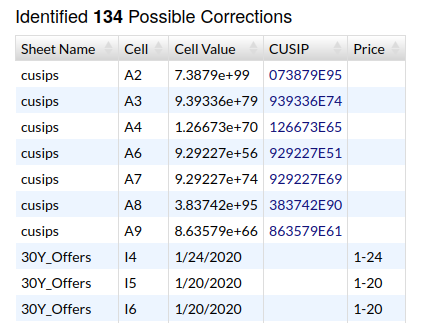
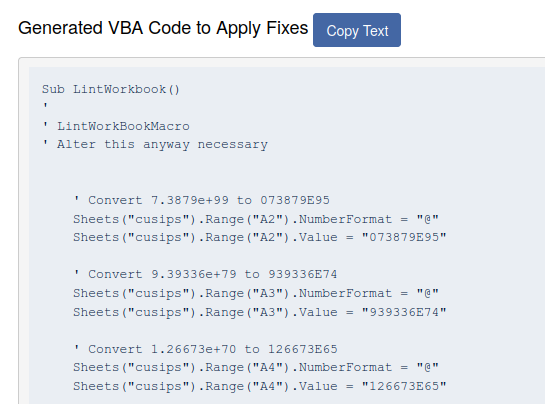
After selecting a file to scan, our linter will get to work. All data processing takes place entirely within your browser (see Data Safety below). If our linter detects fixable errors, they will appear in two sections in the lower part of the page (see images below). The table on left will enumerate each error, its location, and a proposed fix. The section to the right is auto-generated VBA code to apply these fixes. To run these fixes, copy this code into a new VBA module on your spreadsheet, and then execute the LintWorkbook macro. All coded corrections are commented for easy inspection before macro execution.
Data Safety
None of the data in your spreadsheet will leave your browser and hit any remote servers. To verify, hit F12 (Developer Tools) on your browser and watch the Network tab.
Other Resources
Parser Replay Viewer
Nov. 23, 2021
Empirasign first introduced our Parser as a Service in 2017 to provide users with access to our market-leading, proprietary parsing technology via the simplicity of an API call. In the Extract, Transform, and Load process for message handling, the heavy lift is the Transform step. Our Parser as a Service enables clients to off-load this step to an outside vendor whose long-standing core competency is transforming unstructured data into structured data.
Humans & APIs
Human interaction with APIs can be a challenge -- especially when dealing with large, unstructured data objects such as email messages. To make onboarding and reconciliation easier, our parser has long returned (along with parsed results) a unique identifier. We call this a tx_id. This identifier uses the universally unique identifier format UUID4. Empirasign-client communications can reference this identifier instead of emailing back and forth large blobs of data. But what if we could do better?
Replay GUI
Using the tx_id, any client can view the parsed results of an email they had previously submitted. Easily confirm expectations vs. results and quickly file bug reports, all on one page. See screenshots below.
Report Aggregate Section
This sections show summary stats and code revision information. There is also a button to file a bug report that will automatically link to the tx_id.
Validated Results Section
HTML Email Body Section
Most emails are transmitted via the multipart/alternative or multipart/mixed subtype of the MIME specification. These subtypes generally allow for two message bodies--one nicely-formatted (text/html), and one pure text (text/plain). The example screenshot below of a runs message shows the nicely-formatted message body that you generally see today. We also capture and process the text/plain message body if that section is more informative.
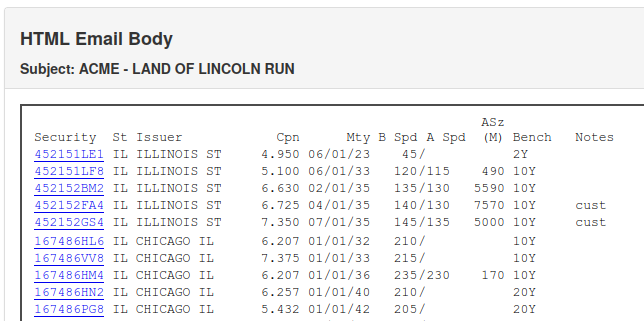
Other sections of the report (not shown here), include raw data acquired (before normalization and validation), text email body, attachments, and "Export to CSV" buttons.
Value Prop
How does this differ from a regular JSON Pretty Printer? Most notably, our reports are constructed how our clients expect to see data organized (e.g. bid to the left of offer, and separate sections for each part of the process). However, the biggest difference from a generic Pretty Printer is that each time the page is loaded, the parser is re-run -- hence the "replay" name. As the page is dynamic, the client can quickly confirm if any recently applied code changes have affected data yield. The dynamism is the power in this tool.
Data Privacy
To allow for this replay functionality and for debugging purposes, all parsed messages are stored for two weeks. After which, they are permanently deleted. To opt out of this functionality and its necessary ephemeral data storage, simply pass along the boolean replay=false with each parse API call.
Feature Status and Road Map
Currently available:
• Corporates and Munis: https://www.empirasign.com/replay/parse-corp/{tx_id}/
• BWICs: https://www.empirasign.com/replay/parse-bwic/{tx_id}/
Set to release in the next few business days:
• Structured Products: https://www.empirasign.com/replay/parse-run/{tx_id}/
Freemium
Get started now with Empirasign Parser as Service. Our no-obligation Freemium service tier allows for 100 messages parsed per day (BWICs or runs). Contact us to get started today.
View our Parser as a Service docs here.